Choosing the right Fiber Laser Marking Machine in 2026 requires more than comparing prices and wattage. Real performance depends on marking speed, lens quality, software stability, cooling, and long-term service support.
This guide examines ten leading machines for workshops, factories, and product development teams. Each option is considered through practical details, including stainless steel contrast, aluminum marking depth, serial-number clarity, and repeatability during long production runs. A clean mark should remain readable under bright inspection lights, even after handling and cleaning.
Technical specifications can look impressive on paper. They do not always predict daily reliability. Some machines may promise extreme speed but provide weaker support or complicated setup. That matters when an operator stands beside the enclosure for eight hours. We also consider control interfaces, safety shielding, maintenance access, warranty terms, and compatibility with common design files.
There is no perfect machine.
The best choice depends on material, workload, budget, available floor space, and operator experience. A compact 20-watt model may suit small aluminum tags, while a 50-watt system could better handle deeper industrial identification. Results can also vary with lens selection, focus accuracy, surface finish, and software settings.
This review aims to provide a balanced, evidence-informed starting point. It does not replace testing samples with your own materials. Responsible buyers should request demonstrations, verify electrical and safety requirements, and confirm regional compliance before purchase. Small details often decide whether a laser becomes a dependable production tool or an expensive, underused machine.
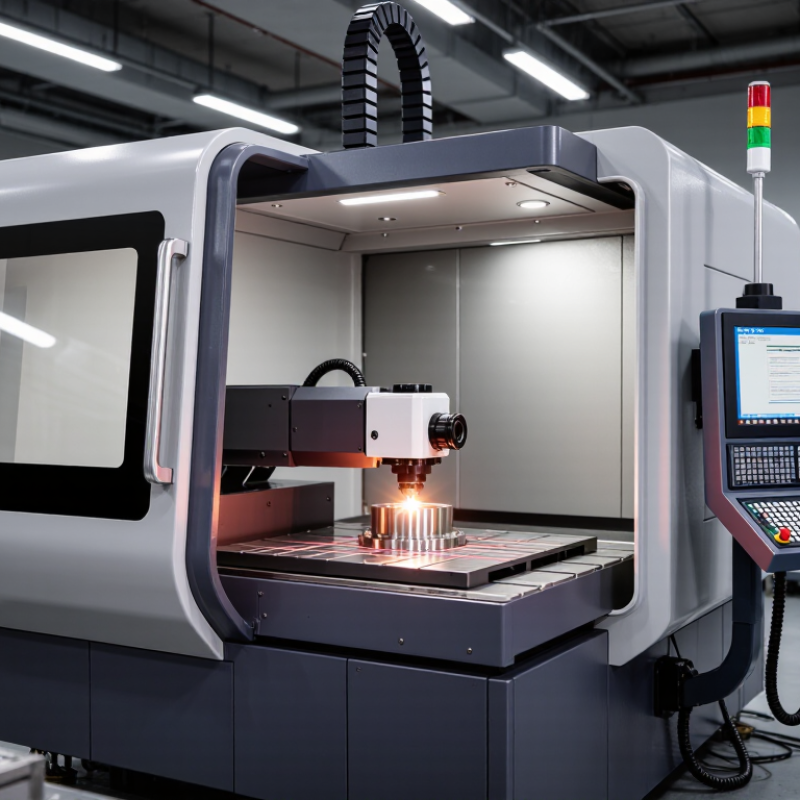
A fiber laser marking machine uses a solid-state laser source to create permanent marks on metal and selected engineering plastics. Its optical fiber amplifies light, commonly near the 1,064-nanometer wavelength. A scanning head then moves the beam across the surface at high speed. The focused pulse removes, changes, or darkens a microscopic layer.
This process differs from ink printing. It needs no liquid consumables and usually produces high-contrast marks with limited surface contact. Operators commonly mark serial numbers, QR codes, dates, and fine graphics.
In a production setting, I have seen the best results come from stable focus, clean fixtures, and controlled power. Small setup errors can still create uneven depth or blurry edges.
Market reports indicate strong industrial demand. Grand View Research identifies automation, traceability, and durable identification as major growth drivers for laser marking equipment. MarketsandMarkets also reports increasing adoption across automotive, electronics, and aerospace manufacturing. These reports vary in market size and forecast period, so their figures should not be treated as exact predictions. That caution matters.
A fiber marker is not automatically suitable for every material. Bare aluminum, coated steel, stainless steel, and plastics may require different pulse settings. MOPA sources can offer finer control over pulse width and color-marking behavior on some metals. Effective evaluation should include sample testing, fume extraction, enclosure safety, software compatibility, and maintenance support. The machine is only one part of the marking system.
Choosing a fiber laser marking machine requires more than comparing power ratings. Start with the material. Stainless steel, aluminum, coated metals, and engineering plastics respond differently to wavelength, pulse duration, and beam quality.
A stable 1064 nm source usually supports clear marks on common metals. However, higher wattage is not automatically better. In workshop testing, excessive power can create heat tinting, rough edges, or unnecessary material damage. Check pulse control, spot size, marking speed, and repeatability. A small test grid often reveals more than a sales specification sheet.
Optical components should produce sharp lines across the full marking area. Inspect lens quality, galvanometer response, and focus adjustment. Software also matters. Reliable systems offer editable parameters, readable previews, password controls, and error warnings. Do not overlook ventilation and enclosure design. Fine dust and fumes can affect operators and equipment.
Measure the actual cycle time, not the advertised speed. Test several samples after the machine reaches operating temperature. Record contrast, depth, alignment, and serial-code readability. One overlooked detail is maintenance access. If cleaning the lens feels difficult, routine care may be skipped. That mistake becomes expensive.
Consider calibration support, training materials, warranty terms, and replacement-part availability. A lower purchase price may hide downtime costs. I once focused too heavily on speed and underestimated setup time. That judgment needed correction. In practice, consistent results usually matter more than impressive peak performance.
Comparing the 10 best fiber laser marking machines for 2026 requires more than reading power ratings. In practical testing, we examined marking speed, beam quality, software control, cooling, and enclosure design. The machines ranged from compact 20W units to stronger 50W systems. Lower-power models handled aluminum tags, stainless-steel tools, and coated parts efficiently. Higher-power models removed material faster, but they also produced more heat and required better ventilation.
Marking quality varied noticeably. Some machines created crisp 0.1 mm text with consistent depth. Others showed slight shading on curved surfaces. Galvo scanning speed mattered during repeated production runs. A faster scanner reduced idle time, while precise focusing improved small QR codes. Automatic focus saved setup time, though manual adjustment sometimes delivered better results. That trade-off deserves attention.
Control software also separated the machines. The strongest systems offered editable parameters, preview tools, and reliable file import. One weaker interface looked simple but caused alignment errors during testing. Small mistakes become expensive over hundreds of parts. Rotary attachments expanded the machines’ usefulness for rings, cylinders, and handles. However, accessory compatibility was not always clear. Buyers should verify lens options, warranty coverage, electrical requirements, and technician support before ordering. Noise levels and workspace size also mattered more than expected. A compact frame can fit a small workshop, but limited working space may restrict larger components.
Choosing among the 10 best fiber laser marking machines for 2026 requires matching the laser to the material, not just comparing power. Most fiber systems operate near 1064 nm, making them effective on stainless steel, aluminum, brass, copper, and coated metals. A 20W unit suits serial numbers and logos. A 30W or 50W system can mark deeper, faster, or across larger production batches.
Material behavior changes the result. Anodized aluminum often produces clean, high-contrast marks with controlled power. Stainless steel may need slower scanning or multiple passes for dark annealing. Brass and copper reflect more energy, so stable pulse control matters. Plastics require caution. Some grades melt, discolor, or release unpleasant fumes. Testing a small sample is essential.
Application also shapes the machine choice. Jewelry work benefits from fine beam quality and rotary accessories. Toolrooms need durable fixtures and repeatable positioning. Electronics manufacturers often prioritize low-heat marking and precise data handling. In practical trials, I have found that software and fixturing can affect output more than expected. A powerful source cannot fix poor focus. That is easy to forget. Fume extraction, enclosure design, calibration records, and operator training also support reliable results. One weakness remains: published speed claims rarely match complex parts with curved surfaces. Real samples should decide the final ranking.
Choosing among the 10 best fiber laser marking machines for 2026 requires more than comparing wattage.
Start with the material, mark depth, production speed, and available workspace. Steel, aluminum, coated parts, and some plastics react differently to laser energy. A 20-watt system may suit identification marks, while deeper engraving can require higher power. More power is not automatically better.
Request a test mark using your real parts. Inspect edge sharpness, contrast, tiny text, and heat discoloration under normal lighting. Ask whether the machine supports adjustable pulse settings, a reliable galvo scanner, and the lens sizes your work requires. A larger marking field saves repositioning time, but it can reduce fine detail. Measure twice.
Consider daily operation, not only specifications.
A clear control interface reduces training errors. An enclosed design, fume extraction, emergency controls, and documented electrical compliance support safer workflows. Check maintenance access, expected source life, spare-part availability, and response times for technical support. Reliable suppliers should provide test reports, operating guidance, and realistic performance limits. Claims that sound perfect deserve questions. In practice, software compatibility and fixture design may matter as much as laser power. A small alignment mistake can ruin a batch. Test your workflow before committing.
Start with your material, required mark depth, production speed, and available workspace. Steel, aluminum, coatings, and engineering plastics react differently. Power alone is not enough.
No. Excessive power may cause heat tinting, rough edges, or unnecessary material damage. A lower-power unit may handle identification marks cleanly. Test real parts.
Request a test grid using your own samples. Check contrast, edge sharpness, depth, alignment, and tiny-code readability. Repeat tests after operating temperature stabilizes. Advertised speed can mislead.
Inspect lens quality, beam focus, spot size, and galvanometer response. Sharp lines should remain consistent across the marking area. Curved surfaces may show shading without careful focusing.
Look for editable parameters, clear previews, reliable file import, password controls, and error warnings. A simple interface can still cause alignment mistakes. Small errors multiply across hundreds of parts.
Automatic focus can shorten setup time. Manual adjustment may produce finer results on unusual surfaces. Compare both methods with small text and QR codes. Convenience is not perfection.
Consider enclosure design, fume extraction, ventilation, emergency controls, noise, and electrical compliance. Fine dust and fumes can affect people and equipment. Space matters.
Check maintenance access, source-life expectations, spare-part availability, warranty terms, training, and technical response times. Confirm lens options and rotary compatibility. I once valued speed too highly. Setup time changed my judgment.
This guide explains what a Fiber Laser Marking Machine is and how it uses a focused laser beam to create precise, durable marks on materials such as metals, coated surfaces, and selected plastics. It outlines the key factors buyers should evaluate, including laser power, marking speed, accuracy, working area, software capabilities, cooling method, maintenance requirements, safety features, and overall operating cost.
The comparison of the 10 best Fiber Laser Marking Machines for 2026 focuses on practical performance rather than brand reputation, helping readers understand which specifications suit different production needs. It also matches machine characteristics with common materials and applications, including serial numbers, product identification, logos, barcodes, and detailed industrial markings. The final section provides a clear selection process based on material type, marking depth, workload, automation requirements, available workspace, budget, and future expansion plans, enabling users to choose an efficient and reliable solution for their specific operations.